January 20, 2014

Tweaking an Online Course

I’m tweaking the online course I’ll be teaching in March and April. (Courses can always be improved!) The student evaluations from the last time I taught this course will provide some suggestions. So will my own reflections about the class. But, I want to reach out a bit for ideas that neither my former students nor I may have considered. I have been curating ideas about blended and online courses at Scoop.it! (http://www.scoop.it/t/blended-learning-and-online-learning). This evening I reviewed some ideas from three of the articles that I posted at Scoop.it!

Planning Your Online Course / Giulia Forsythe / CC BY-NC-SA 2.0

10 Tips for Effective eLearning (http://www.edudemic.com/elearning-tips/)
by Katie Lepi (http://www.edudemic.com/author/katie/)
at Edudemic (http://www.edudemic.com/)
  1. Katie Lepi recommends that the course have a great beginning. I will review my class’s beginning. Does it hook the students? Will they be interested?
  2. State the objectives. I think that should probably be more than just providing a syllabus for the students!
  3. Address learning styles. I do that in my face-to-face classes. I need to remember to do it in online classes, too.
  4. Be sure the students can find their way around the course. Provide good instructions for them. Of course I think my instructions are clear… but I will read them again to be sure that the students will agree.
  5. Use a conversational style. That one’s easy!
  6. Assessments should be relevant rather than just academic. I think they are; but, I do need to be sure I get that message across to the students.
  7. Format the content so that the message is clear.
  8. Approximately every third page should be interactive rather than every page. That’s interesting… and surprising.
  9. The class learning process should flow as it does in a face-to-face classroom. I think it does, but I will examine the course again to check.
  10. “Organize related content together on one screen, keeping the learner’s attention focused on one topic at a time.” That’s certainly logical. I will examine the course to determine if I have done that.
Lepi has certainly listed some good ideas to help the class learn well. I will examine the course with these ideas in mind this week.


5 Best Practices in Online Learning (http://www.eschoolnews.com/2014/01/10/practices-online-learning-407/?)
by Meris Stansbury (http://www.eschoolnews.com/author/mstansbury/)
at eSchool News (http://www.eschoolnews.com/)
  1. Provide “immediate and specific feedback” to the students
  2. Be sure there is support for struggling students
  3. Instructors should be trained to teach online… and should keep learning
  4. The curriculum should be engaging with content delivered in a variety of ways
  5. Provide the students with training to take an online course
Stansbury is describing a district’s responsibilities here. However, as an instructor, I can include these ideas in my implementation of the course.


Make 2014 Your Year: 24 Stats & Tips to Boost Your eLearning Strategy (http://info.shiftelearning.com/blog/bid/330033/Make-2014-Your-Year-24-Stats-Tips-to-Boost-Your-eLearning-Strategy)
by Karla Gutierrex (http://info.shiftelearning.com/blog/?Author=Karla+Gutierrez)
at SHIFT’s eLearning Blog (http://shiftelearning.com/)
  • Many factors play a role in the success of an online course
          a. the background and experiences the students bring
          b. the graphics, fonts, and words you use to create the course
          c. what the instructor expects from the students
  • Tell stories that pull in the students
  • Emphasize activity
  • Content chunks should last about 7-10 minutes
  • Focus on the students’ needs and interests, not yours
  • Use relevant graphics, not filler images
  • Be sure students understand that practice does makes perfect
  • Use good design to help students learn, not to distract them
  • Help the students understand how the course will facilitate their solving of problems
  • The course should be easy for students to navigate
  • Make the content something that students will want to remember
“According to Chip and Dan Heath, authors of the book Made to Stick, for content to stick, it has to make people: Pay attention (to something unexpected), understand and remember it (because it’s concrete), believe in it (because it’s a credible idea), truly care about it (or make an emotional connection with it) and be able to act on it (by telling it as a story.)”
  • Make the content easy to read
          a. highlight keywords
          b. use headings
          c. write concisely
          d. use lists and bullets
  • Design for usefulness, usability, and desirability
  • Simplicity in design makes a course easier to navigate and faster to load
  • Keep the students’ attention with humor and visual aids
  • Design courses that allow the students to explore and try ideas
  • Color affects our reactions and our learning… use color
  • Allow the students to work through the course without your directing every step
  • Write conversationally
  • Use an attractive design
  • Connect with the students’ emotions
  • Provide small chunks of learning content rather than large containers of information
  • Keep the course student-centered
  • Design to motivate the students I will review my course with these ideas in mind. I already do some of these, but I’m sure that an additional look will reveal some areas that should be re-worked.

I’m going to be busy!

January 10, 2014

Ten Photos... and Counting...

Ansel Adams and the American West collection / MoFAstpete / CC NC-ND 2.0
I enjoy the photography of Ansel Adams. His black-and-white photos of nature shout out to me the designs of a creative God and at the same time they illustrate geometry in the world around us. It’s obvious that I spent many years teaching geometry in a high school classroom. I often illustrated concepts by using photos (taken by my husband) of geometry in everyday life on my bulletin board.

While it would take years to develop the skills of a photographer as talented as Ansel Adams, I can certainly improve the skills I do have. In an effort to become a better photographer I have decided to (again) initiate a Project 365. That’s one photograph taken and posted each day. I must admit that the last time I tried this was in 2009. There are 31 photos in that collection. This year I would like to make it all the way to 365 photos.

In addition to improving my photography skills I also want to add to my Stock Photography collection. Those are photos that I can use on my blog posts. I’ve used a few of my photos to illustrate my blog writing, but I still depend heavily on Creative Commons and Flickr.

I am temporarily posting my photos on my blog under the Project 365 / 2014 tab. I am also posting them in my Flickr account. And three of them (a random selection) display on the front page of my blog. As the number of photos in my collection increases I will decide which method is best for posting them.

Nancy Messieh and Saikat Basu wrote (for MakeUse Of) about Project 365 collections and other ways to improve your photography.

In their articles I found places to go for inspiration:
  • Online communities
  • Entertainment art
  • Professional and classic art
  • Tutorials
  • Competitions

I learned about websites dedicated to one-photo-everyday projects:

I read about projects that provide ideas for photos to shoot during a Project 365:
  • Pick a lens
  • Connect to the written word
  • Take a daily self portrait
  • Pick a theme
  • Pick a photography style
  • Go for Bokeh
  • Pick a prop
  • Pick a color
  • Go on photo walks

I have been following four photography blogs. I learned about 10 more to check:

And, finally, I now have a list of ways to help me build the “photo habit”:
  • Photography inspiration every day
  • Look at photography
  • Don’t look at photography
  • Look at everyday things
  • Shoot around a single theme
  • Shoot for a photo challenge
  • Do a selfie
  • Clear the clutter

Here are the articles and authors that will (hopefully) help me reach my goal of 365 photos in 2014:

8 Easy Ways to Get Started with a Photography Habit Today
Saikat Basu
January 8, 2014
http://www.makeuseof.com/tag/8-easy-ways-get-started-photography-habit-today/

10 Blogs that will Make You into an Amazing Photographer
Saikat Basu
July 16, 2012
http://www.makeuseof.com/tag/10-blogs-amazing-photographer-si/

Don’t Let Your Camera Collect Dust: 10 Inspiring Ideas for Photography
Nancy Messieh
April 20, 2013
http://www.makeuseof.com/tag/dont-let-your-camera-collect-dust-10-inspiring-ideas-for-photography/

5 Methods to Find Inspiration for Your Photography Online
Nancy Messieh
February 28, 2011
http://www.makeuseof.com/tag/5-methods-find-inspiration-photography/

Swap Your PJs for a Camera – Try Taking a Photo a Day and Improve Your Photography
Saikat Basu
August 10, 2012
http://www.makeuseof.com/tag/swap-pjs-camera-photo-day-improve-photography/

Top 4 Photo Websites to Share One Photo Everyday
Nancy Messieh
March 29, 2010
http://www.makeuseof.com/tag/top-4-photo-sharing-websites-share-photo-everyday/

Lots of resources. Now… to build that habit! 

January 5, 2014

Who Do You Follow?

Follow My Lead / Saxon Moseley / CC BY 2.0
Finding individuals to follow can be challenging for educators the first time they decide to find out if there is something to this idea of professional development and PLNs in social media. It gets easier. An educator that we follow through his/her blog or Twitter feed mentions someone else… we follow that person… who provides a link to an article whose author we decide to follow… and so it goes. But, sometimes, we want to experiment… to step outside the box. That’s where lists of interesting educators—and non-educators—are helpful. Here are some current lists that are worth checking. What lists do you recommend to others?

Lists of educators only…

100+ Influential Learning Professionals Worth Following
Jeff Dunn
Edudemic
http://www.edudemic.com/100-influential-learning-professionals-worth-following/

The Edublog Awards
http://edublogawards.com/

Rewarding excellence in international education: the 2013 EAIE Award winners
http://www.eaie.org/blog/rewarding-excellence-the-2013-eaie-award-winners/

2013 – Finalists & Winners… the EdTech Digest Awards Program 2013
http://edtechdigest.wordpress.com/2013/04/04/2013-finalists-winners/

SIIA Announces CODiE Award Winners for Education Technology Industry
http://www.siia.net/blog/index.php/2013/05/siia-announces-codie-award-winners-for-education-technology-industry-2/


Lists that include non-educators…

We Follow
http://wefollow.com/

The 106 Finance People You Have To Follow On Twitter
Linette Lopez, Julia La Roche, and Steven Perlberg
http://www.businessinsider.com/finance-people-to-follow-on-twitter-2013-10?op=1

Who Do Members of Congress Follow on Twitter?
Dan Amira
http://nymag.com/daily/intelligencer/2013/08/who-do-members-of-congress-follow-on-twitter.html

100 Must Follow On Twitter 2014
Vala Afshar
http://www.huffingtonpost.com/vala-afshar/100-must-follow-on-twitte_b_4398144.html

Thirteenth Annual Weblog Awards: The 2013 Bloggies
http://2013.bloggi.es/

The 2013 Canadian Weblog Awards Winners
http://www.canadianweblogawards.com/canadian-weblog-awards/2013/12/7/the-2013-canadian-weblog-awards-winners.html

The WEBBY Awards 2013
http://winners.webbyawards.com/2013

December 28, 2013

Looking for Videos

Students Watch an Introductory Video... / UK Parliament / CC BY-NC 2.0
Videos can help students learn concepts new to them. So, today I have been searching for videos that may be helpful for some courses this Spring and this coming Summer.

I teach teachers and pre-service teachers how to use instructional technology to help their students learn. I have listed some sites and topics that I think provide interesting choices. You may find them useful, too.


from…
Five-Minute Film Festival
http://www.edutopia.org/blogs/beat/five-minute-film-festival
http://www.edutopia.org

from…
Teacher Training Videos
http://www.teachertrainingvideos.com/

from…
Edudemic: connecting education & technology
http://www.edudemic.com/
  • The 100 Best Video Sites for Educators
    • educational video collections, general video collections, teacher education, lesson planning, science, math, and technology, history, arts, and social sciences, video tools, network and program videos, free movies and clips, how-to's, government and organizations, see comments for more suggestions
    • http://www.edudemic.com/best-video-sites-for-teachers/

from…
Teaching Channel
https://www.teachingchannel.org/
Videos: https://www.teachingchannel.org/videos?default=1


from…
YouTube
http://www.youtube.com

from...
Wiki-Teacher
lessons and units, demonstration videos, unwrapped standards
http://www.wiki-teacher.com/aboutUs.php

December 23, 2013

Merry Christmas!

Merry Christmas by blacklord / CC BY 2.0


No blog post this week...
just wishes for a merry Christmas,
time with family and friends and all you love,
and a peaceful rest good for the soul and the body.

Blessings and peace to all!

Jo

December 17, 2013

Tips for Creating and Using Screencasts

Today I’m planning some lessons for a Spring workshop. One of the topics is how to create and use screencasts. Rather than start with software choices for screencasting I want to begin by demonstrating how to make screencasts good… effective… useful for the learners. And I want the workshop participants to consider screencasting as a classroom tool for both teachers and students to help with instruction.

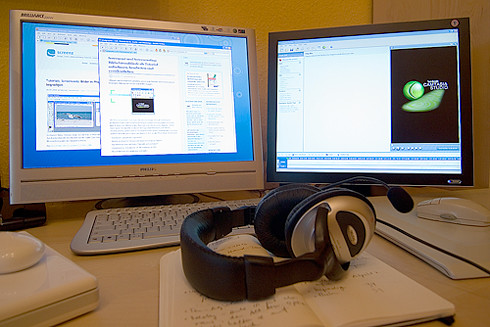
When I prepare a screencast I usually clear off my computer’s desktop so folders and other icons that have no connection to the screencast are not displayed. I never thought about clearing off the hard drive icons, too, until I read Mel Aclaro’s 6 Must Do Tips for a Quality Screencast. How do I clear off the drive icons? Drag them over to a second monitor! Aclaro uses his second monitor to help with other details, too. He keeps items there that he plans to use in his screencast so he can pull them over to his first monitor when he wants them to show up on the screencast. It’s also a good spot to post my script or outline for the screencast.
Screencast setup
Manuela Hoffman / Screencast Setup  /   CC BY-NC-ND 2.0

I know that not everyone has two monitors connected to their computers. I don’t. But, many of us have an old monitor that we could use for this purpose. And the IT person at school may likely have an old monitor that he could connect to one of the computers in your classroom. Plus… we have to think big. Right?

I appreciate screencasts that spotlight the cursor so it is easy to follow. I have used software that helps that to happen. But, Aclaro’s recommendation is so easy… we just use the Universal settings that allow us to enlarge the cursor. On a Mac we go to System Preferences > Accessibility > Cursor Size. We can see Windows instructions for doing this at Microsoft’s support page (http://windows.microsoft.com/en-us/windows/make-mouse-easier-to-use#1TC=windows-7).

These are just two of a half-dozen recommendations in Aclaro’s article/video for scaling up the quality of my screencasts.

Wesley Fryer urges us to plan and prepare when our students are going to create screencasts to demonstrate what they have learned. Will the students use photos? Find them. Make them accessible. (See Creating Narrated Slideshows & Screencasts.)
Mise En Place
Jen Waller / Mise en Place / CC BY-NC-SA 2.0

I would recommend that the script be written beforehand. Have it ready, too. Having everything at hand and ready to use reminds me of mise en place—the organizing and arranging of ingredients ahead of time for cooking. Having everything prepared saves time and allows us to focus on our goal whether it’s a delicious entrée or a helpful screencast.

Kathy Schrock’s Screencasting in the Classroom provides a wealth of resources on this topic. Two of the ideas I gleaned from her page include reasons why we (both teachers and students) might want to create screencasts and recommendations for creating and using those videos.

Schrock shares why teachers and students might create screencasts:
  • enhance explanations with visual information
  • model a process for students or for parents
  • peer-to-peer tutoring
  • respond to problems and questions
  • student presentations
  • summarize what has been learned
  • teach others
  • watch and answer questions about a topic BEFORE class
She also provides some recommendations about the videos:
  • keep videos short (less than 10 minutes)
  • use your voice in the video… students will respond to it better than to someone else’s voice
  • hold the students responsible… have them write a summary or answer questions
So… back to my planning. I think I will…
  • ask the participants about their experiences with screencasts
  • have them share their ideas for creating screencasts
  • provide a list of recommendations for creating quality screencasts (such as the ones in this article)
  • provide resources that they can search for more ideas that appeal to them (Scoop.it! has a great list)
  • and have them share their ideas with each other
And, of course, then they will create screencasts and share with us the techniques and ideas they used.

I think I have a good beginning. What would you recommend for the screencasting topic in this workshop?

December 9, 2013

It’s Time to Add to Our PLNs

My students – preservice teachers – learned how to create their own PLNs this semester. The students read education blogs and they wrote their own. They use a reader to make following blogs easier. They followed educators on Twitter… and they learn to tweet, to retweet, and to favorite. They shared as well as benefitted from what they read. Their favorite curation tools were Delicious and Pinterest. They created plans to curate and share what they learned as well as use it in their own soon-to-be classrooms. They also planned to publish their own experiences and ideas. They are excited about the opportunities that collaborating with others in our PLNs offers to today’s teachers.

One of the challenges when developing your PLN is to find blogs to follow. There are many excellent education blogs today, but each beginning teacher comes from a different place with individual experiences and needs. Choosing the first blogs to follow can sometimes be challenging. I, of course, make suggestions for a variety of disciplines. I also provides lists of award-winning and award-nominated blogs.

Vicki Davis (Cool Cat Teacher) has published an article about this year’s Edublog Award finalists and accompanied it with some of her usual wisdom and experience. In a message that I send to my students this week (exam week already!) I will recommend that they read her article and check out the blogs on the finalists list. You can read it at The Edublog Awards and the Legacy of Beth Holmes. I know that I plan to add to my PLN through the Edublog Award finalists list!