April 2, 2013

April 1, 2013
March 16, 2013
Scavenger Hunt IT

Instructions:
Find the correct answer to each question.
Answers must come from the listed websites (below).
Be sure to indicate the website (by number, if you wish) where you found the answer.
And, yes, each website is used once, but the websites are not necessarily in the same order that the questions are.
Websites:
- http://www.wikipedia.org
- http://weblogg-ed.com/2006/great-fifth-grade-book-wiki/
- http://k12onlineconference.org/
- http://en.wikipedia.org/wiki/Assistive_technology
- https://support.twitter.com/groups/31-twitter-basics/topics/110-search/articles/132700-how-to-search-on-twitter#
- What are the hardware and software called that are designed to help persons with special needs?
- How many articles are in the (English) Wikipedia?
- How do you search for a topic on Twitter?
- What is the home of the virtual conference for using Web 2.0 tools and technologies in instruction?
- What book was used by fifth-graders in Georgia for a wiki about studying a book?
December 2, 2012
Polling Options
No, it's not time for another political poll. But it might be the appropriate time to poll your students to assess their opinions and/or their knowledge on a particular topic. One of the polling options I am investigating is Poll Everywhere, a web-based option.
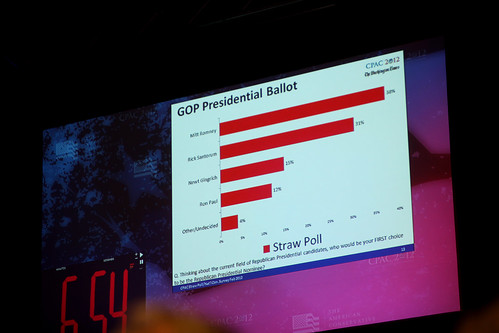 Poll Everywhere is an online polling application. This is an experiment to see how it works in a blog.
Poll Everywhere is an online polling application. This is an experiment to see how it works in a blog.October 27, 2012
Creating Online Slideshows and Videos
I'm experimenting with web-based slideshows and videos. I have tried a number of applications. Some permit you to use your own photos and/or video clips... others are self-contained. Some are like cartoons. Playing with these applications has been fun rather than work, though.
I eliminated applications that provide demos which include words I would not use in front of my students. The availability of a free account was also a necessity. That doesn't mean that a whole classroom can use the application with no cost. Each application must be evaluated as to usefulness and cost for a particular teacher or classroom or school.
Many applications allow the video that you create to be shared with a link or with embedded code. I have posted some of each (links and embedded code) on this blog post as examples.
The applications I tried came from a combination of suggestions from Richard Byrne's blog (http://www.freetech4teachers.com/) and my bookmarks on Delicious.
I still like videoediting with stand-alone applications (e.g., iMovie and MovieMaker), but I think there is definitely a role that these web-based applications can play in the classroom for both the teacher and the students.
What do you think? What has been your experience?
Photo Peach - Link
http://photopeach.com/album/p0t0wg
Photo Peach - Embedded Story
Spring 2013 in Lake Township on PhotoPeach
Photo Peach - Embedded Spiral
Spring 2013 in Lake Township on PhotoPeach
Animoto - Embed Code
Make your own slide show at Animoto.
ScreenCastle - Link (Note: You can also use Screenr (http://screenr.com) for something like this.)
http://screencastle.com/watch/4a655e86fd58d2a62c1b95c677b20775
Go!Animate - Link
http://goanimate.com/go/movie/0AgKlLFIcPmg?utm_source=emailshare&uid=
Links in this post...
I eliminated applications that provide demos which include words I would not use in front of my students. The availability of a free account was also a necessity. That doesn't mean that a whole classroom can use the application with no cost. Each application must be evaluated as to usefulness and cost for a particular teacher or classroom or school.
Many applications allow the video that you create to be shared with a link or with embedded code. I have posted some of each (links and embedded code) on this blog post as examples.
The applications I tried came from a combination of suggestions from Richard Byrne's blog (http://www.freetech4teachers.com/) and my bookmarks on Delicious.
I still like videoediting with stand-alone applications (e.g., iMovie and MovieMaker), but I think there is definitely a role that these web-based applications can play in the classroom for both the teacher and the students.
What do you think? What has been your experience?
Photo Peach - Link
http://photopeach.com/album/p0t0wg
Photo Peach - Embedded Story
Spring 2013 in Lake Township on PhotoPeach
Photo Peach - Embedded Spiral
Spring 2013 in Lake Township on PhotoPeach
Animoto - Embed Code
Make your own slide show at Animoto.
ScreenCastle - Link (Note: You can also use Screenr (http://screenr.com) for something like this.)
http://screencastle.com/watch/4a655e86fd58d2a62c1b95c677b20775
Go!Animate - Link
http://goanimate.com/go/movie/0AgKlLFIcPmg?utm_source=emailshare&uid=
Links in this post...
- Richard Byrne's blog (http://www.freetech4teachers.com/)
- Delicious (http://delicious.com)
- iMovie (http://www.apple.com/ilife/imovie/)
- MovieMaker (http://windows.microsoft.com/en-US/windows-live/movie-maker-get-started)
- Photo Peach (http://photopeach.com/)
- Animoto (http://animoto.com)
- ScreenCastle (http://screencastle.com/)
- Screenr (http://screenr.com)
- Go!Animate (http://goanimate.com/)
October 21, 2012
Education Hashtags in Twitter
 | |||
| Canary |
So why am I thinking about birds? I feel like I'm surrounded by Twitter birds this fall! I've enjoyed my students' and my experiment using Twitter in class. I learned a lot about Twitter. I added to my knowledge of educational technology through Twitter. I've also read some wise tweets, some funny ones, and some heart-warming ones.
 |
| Twitter Bird |
I did not plan to write another post about Twitter for a while because I wanted to explore some other interests, but... I couldn't resist sharing Joyce Valenza's post about educational Twitter hashtags. (And thanks to Vicki Davis for sharing it on Twitter!)
In Educational Twitter Hashtags, the infographic, Joyce Valenza has shared popular hashtags that you can use to focus on your areas of interest. Choose a hashtag that interests you and do a search on it in Twitter. Try more than one. You're sure to find some helpful information... and you may want to visit that hashtag (or two or three) again.

Compiled By: OnlineCollegeCourses.com
October 15, 2012
One of Best EdTech Conferences Starts Today
Just a quick note! One of the best conferences available--the K12 Online Conference--begins today (Monday, October 15, 2012) with a keynote presentation by Kevin Honeycutt.The strands that will be available next week (October 22 - 25) are Getting Started and Visioning New Curriculum. The following week (October 29 - November 2) the Kicking It Up a Notch and Student Voices strands will be the focus. Each strand has ten speakers, including one keynoter.
If you're interested in using technology in curriculum, instruction, and/or assessment then you want to be sure to attend this conference. This conference provides each year an outstanding collection of speakers and topics. Could anything be better than that? How about sessions that are available when you have time to watch and/or listen? How about the ability to be involved wherever you are--home, school, at a coffee shop, or in a park? What's the cost, you ask? Free. Honest!
I think that these sessions will be some of the best professional development that you can find for instructional technology. If you're curious about some of the previous conferences, they're still online. You can "attend" conferences from 2006 to this year!
Be sure to mark your calendar...
October 15
October 22 - 25
October 29 - November 2
And keep track of the web site...
http://k12onlineconference.org/
And one more thing... think about sharing some of your ideas next year at the conference.
If you're interested in using technology in curriculum, instruction, and/or assessment then you want to be sure to attend this conference. This conference provides each year an outstanding collection of speakers and topics. Could anything be better than that? How about sessions that are available when you have time to watch and/or listen? How about the ability to be involved wherever you are--home, school, at a coffee shop, or in a park? What's the cost, you ask? Free. Honest!
I think that these sessions will be some of the best professional development that you can find for instructional technology. If you're curious about some of the previous conferences, they're still online. You can "attend" conferences from 2006 to this year!
Be sure to mark your calendar...
October 15
October 22 - 25
October 29 - November 2
And keep track of the web site...
http://k12onlineconference.org/
And one more thing... think about sharing some of your ideas next year at the conference.
#k12online12
Subscribe to:
Posts (Atom)